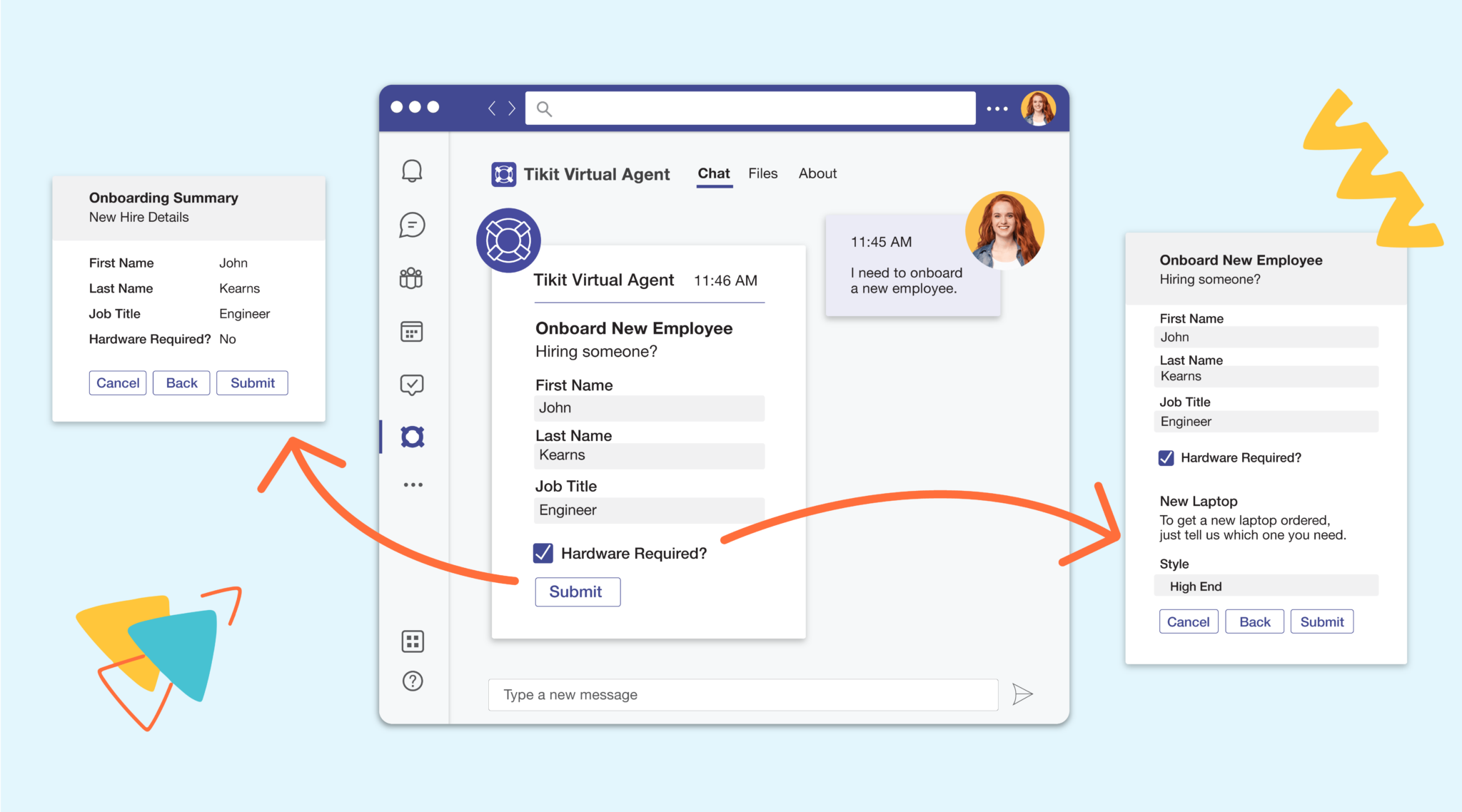
If you’ve ever searched “how to add branching logic to Adaptive Cards”, you already know the answer is… frustrating.
Short answer: you can’t—at least not in the way you actually need.
And that limitation has real consequences:
- Overly long, one-size-fits-all forms
- Poor data quality
- Frustrated users submitting incomplete (or just plain wrong) tickets
With Tikit’s Multi-Turn Cards feature, that changes completely.
This isn’t a workaround. It’s a fundamentally better way to build guided, intelligent forms inside Microsoft Teams.
The Problem: Adaptive Cards Are Static
Microsoft Teams uses Adaptive Cards to power forms and interactions—but they come with a major limitation:
No true branching or dependent inputs
That means:
- You can’t show different questions based on previous answers
- You can’t guide users down different paths
- You can’t dynamically adapt the form experience
Microsoft has introduced Sequential Workflows for Adaptive Cards, but these are not the same thing.
They allow you to chain steps together—but:
- They don’t support intelligent branching
- They don’t adapt based on user input
- They don’t create a guided, decision-based experience
So, what happens instead?
The Workaround (And Why It Fails)
Without branching, most teams fall into one of two traps:
1. The “Mega Form”
A single form with 20–30+ fields to cover every scenario.
Problems:
- Users skip fields
- Required fields can’t be enforced properly
- Forms become overwhelming (“form fatigue”)
2. Power Automate Workarounds
Using flows to interpret responses after submission.
Problems:
- Logic happens after the form—not during
- Users still submit incomplete or irrelevant data
- Maintenance becomes complex and brittle
The Result: Garbage Tickets In, Garbage Out
When forms can’t adapt:
- Users guess what to fill in
- Important data gets missed
- Tickets require back-and-forth clarification
Which slows everything down.
The Solution: Multi-Turn Cards in Tikit
Multi-Turn Cards introduce something Adaptive Cards have been missing:
Guided, conditional form experiences—without writing code
Instead of one static form, you create a dynamic, step-by-step conversation where:
- Each answer influences what comes next
- Users only see relevant questions
- The experience adapts in real time
What Is a Multi-Turn Card?
Think of it like a “choose your own adventure” form:
- User starts with an initial form
- Their answers determine the next step
- They continue down a guided path
- Only relevant fields are shown—and required
Example: Employee Onboarding
Scenario A:
- New hire → Chicago
- → Submit ticket immediately
Scenario B:
- New hire → London
- → Additional relocation form appears
- → Visa details required
- → Then submit
Same process. Different paths. Fully guided.
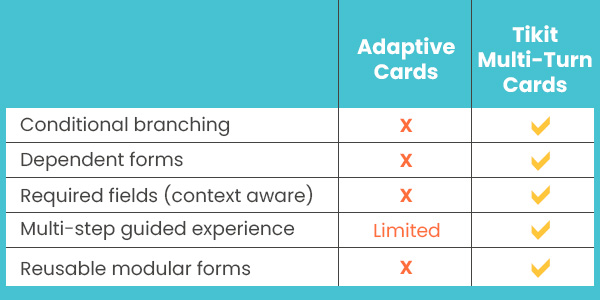
Why This Is Different from Native Adaptive Cards
Let’s be clear—this is not something you can replicate natively
Build Smarter Forms Without Code
Multi-Turn Cards are powered by two key capabilities:
1. Custom Properties
Create structured data fields like:
- Location
- Device type
- Root cause
- Any business-specific input
Use them across:
- Forms
- Templates
- Automations
- SLAs
- Reporting
2. Transitions (Branching Logic)
Define what happens next based on answers:
- If location = London → show relocation form
- If location ≠ London → submit ticket
No scripting. No external tools.
Better UX = Better Data
This isn’t just about flexibility—it’s about outcomes.
Before:
- Long forms
- Irrelevant questions
- Missing data
After:
- Short, focused steps
- Only relevant inputs
- Required fields that actually make sense
Result: Cleaner tickets, faster resolution, better reporting
Real-World Use Cases
Employee Onboarding
- Only show relocation steps when needed
- Add device requests conditionally
Hardware Requests
- Ask follow-up questions based on device type
- Capture exact requirements upfront
Incident Triage
- Route based on issue category
- Collect the right diagnostic data immediately
Location-Based Routing
- Dynamically assign teams or workflows
- Trigger automations based on location input
Built for the Real World
Multi-Turn Cards don’t just work in one place—they extend across the entire Tikit experience:
- Microsoft Teams (Virtual Agent)
- Requester Portal
- Agent Portal
Agents can even:
- Send forms back for updates
- Reuse forms across processes
- Trigger forms via automation
Beyond Forms: Data That Actually Works for You
Because everything is structured:
- Use custom properties in SLAs and automations
- Include them in notifications
- Report on them in Power BI
No more disconnected data. No more guesswork.
Adaptive Cards Needed This. Tikit Delivered It.
For years, teams have tried to solve branching in Adaptive Cards. The demand is clear. The use cases are everywhere. But until now, the solution wasn’t.
Multi-Turn Cards bring true guided experiences to Teams—without complexity.
See It in Action
Want to see how it works in a real scenario? Watch the full webinar demo now or start building smarter, more intuitive forms in Tikit today.