At a Glance
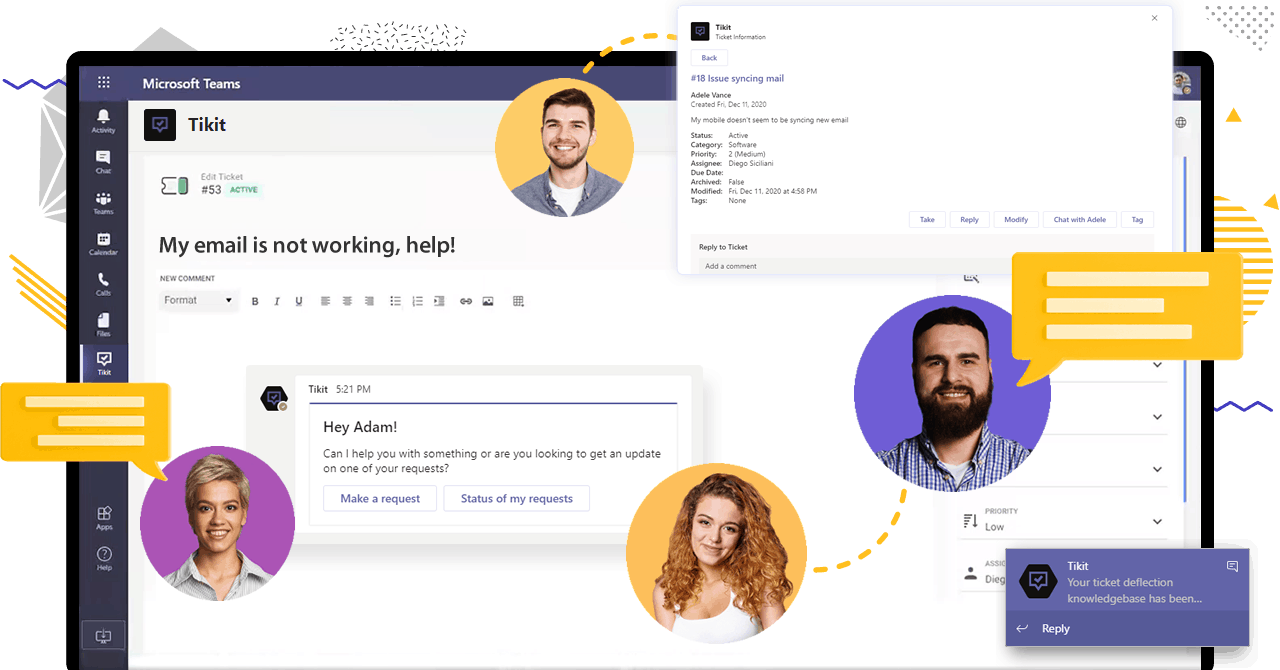
Microsoft Teams is already the communication hub for countless organizations—but with Tikit, it becomes the foundation for a fully integrated Microsoft Teams helpdesk. Built for Microsoft 365 environments, Tikit turns everyday chat conversations into structured service requests, helping IT teams resolve issues faster and employees get help right where they work.
Why Build a Helpdesk in Microsoft Teams?
If your organization already uses Microsoft Teams, you’re halfway to a powerful, connected helpdesk. Teams is where people collaborate, chat, and share updates daily—it’s also where requests for help naturally begin. Instead of redirecting users to a separate ticketing tool, Tikit lets support teams manage everything within Teams.
The result is a more intuitive Microsoft Teams help desk ticketing system—one that removes friction for end users and increases visibility and efficiency for IT analysts.
The Business Value of a Microsoft Teams Helpdesk
A Microsoft Teams helpdesk powered by Tikit creates measurable value for organizations of every size:
- Faster response times – Requests start in Teams chats or channels, cutting the lag between “I have an issue” and “it’s being handled.”
- Simplified processes – Analysts can triage, assign, and resolve tickets without switching tools.
- Better collaboration – Teams’ native messaging, video, and file sharing support a complete conversation around each issue.
- Improved adoption – No new logins, passwords, or training required—users already know how to use Teams.
Tikit builds on this foundation with automation, analytics, and AI-powered deflection—all inside the Microsoft Cloud.
Why Tikit Is the Smart Choice for Microsoft-Orgs
While many ITSM platforms integrate with Teams, Tikit is built for it. That difference matters.
- Native Experience – Employees create and track tickets directly from Teams chat, channels, or email. IT sees everything consolidated in one queue.
- Microsoft 365 Integration – Tikit connects seamlessly with tools your organization already uses—Outlook, SharePoint, Power Automate, and Entra ID.
- Azure Data Residency & Security – All data lives inside your Microsoft tenant, ensuring compliance and control.
- Scalability – Tikit works for small IT teams as easily as it does for global enterprises. Add automations or AI at your own pace.
When you’re already invested in Microsoft, choosing Tikit as your MS Teams helpdesk simply makes sense.
Smarter Support Through AI—On Your Terms
Tikit’s AI is designed to augment human support, not replace it.
Tikit’s AI can:
- Deflect repetitive requests to Knowledge articles or Forms.
- Understand natural language from employees in Teams chat.
- Work across multiple channels—chat, email, and the service catalog.
- Leverage OpenAI securely within your Azure tenant to generate responses from internal documentation.
- Help you identify gaps in your knowledge by allowing users to create tickets for responses that do not provide they help they need
This means faster answers for users and less time spent on repetitive tasks for IT—while maintaining your data privacy and compliance standards.
Setting Up Your Microsoft Teams Helpdesk
Creating a helpdesk in Microsoft Teams with Tikit is straightforward:
- Install Tikit from the Microsoft App Store.
>You’ll find Tikit under Microsoft-approved apps. Installation takes just minutes.
- Create Your Team of Agents.
>Create your Team for staff to handle incoming requests.
- Deploy Tikit Virtual Agent
>This is the chat experience through which end users find support or submit tickets.
- Enable Multiple Entry Points.
>Employees can open tickets via Teams chat, channels, or email—all funneled into a single request queue.
- Configure Workflows with Automations.
>Use Tikit Automations or Power Automate to route tickets, assign priorities, or trigger notifications.
- Train Your AI for Deflection.
>Monitor your tickets and add knowledge and templates to deflect future requests where possible.
For IT Teams: Streamlined Triage and Reporting
Behind the scenes, Tikit keeps agents organized with clear visibility into:
- Ticket volume and type
- Categories and request status
- SLA tracking and performance metrics
Excel and/or Power BI dashboards provide a real-time view of IT workload and trends, making it easier to demonstrate ROI and identify improvement areas.
Built for the Way Teams Work Today
Remote and hybrid work have made collaboration tools the default workspace for most organizations. A helpdesk that lives within Microsoft Teams supports that shift—allowing IT to meet users where they already are.
Tikit extends Teams’ collaborative DNA into service delivery, creating a conversational, familiar, and efficient experience for both sides of the ticket.
Frequently Asked Questions About Building a Microsoft Teams Helpdesk
Can Microsoft Teams be used as a helpdesk?
Yes. Microsoft Teams can function as a helpdesk when paired with a solution like Tikit. Because Teams is already where employees collaborate and communicate, it’s an ideal foundation for managing support requests. Tikit extends Teams’ functionality into ticketing, triage, automation, and reporting—all within the Microsoft 365 environment.
What is the best Microsoft Teams helpdesk solution?
For organizations built on Microsoft 365, Tikit is a strong choice for a Microsoft Teams helpdesk. It is built natively for Teams so employees can open and track tickets without leaving chat or channels. Analysts can triage, automate, and resolve tickets in the same workspace. Unlike tools that only integrate with Teams, Tikit is designed specifically for the Microsoft ecosystem and offers AI-powered deflection and workflow automation.
How do I create a helpdesk in Microsoft Teams?
To build your helpdesk in Teams:
- Create your team of agents
- Deploy the Tikit Virtual Agent
- Enable email-to-ticket and chat-based ticket creation.
- Configure workflow automations to route requests appropriately.
- Train Tikit’s AI deflection with your knowledge base using the Tikit Quick Start Guide.
This process turns Teams into a complete Microsoft Teams help desk ticketing system without needing a separate support portal.
What does Tikit’s AI do in Microsoft Teams?
Tikit’s AI is designed to support human analysts by deflecting repetitive requests to knowledge articles or forms. The solution uses your responses and templates, reflecting your organization’s own language and data, to work across chat, email, and the service catalog. For example, see how Tikit’s OpenAI integration and knowledge base enhancements improve support experiences.
Can small businesses use Tikit as their MS Teams helpdesk?
Yes. Tikit is scalable for any size. Small businesses can start with a simple request queue in Teams, while larger operations can add automation, AI deflection, and reporting as they grow. Explore how Tikit supports different organization sizes.
Does Tikit store data outside of Microsoft 365?
No. Tikit operates entirely within the Microsoft Cloud ecosystem. For details on its data security and compliance practices, review Microsoft’s app certification for Tikit.
Can Tikit automate helpdesk workflows in Teams?
Yes. Tikit offers built-in automation and integrates with Power Automate for routing, notifications, approvals, and escalations. See the Tikit Integrations page for details.
How can I try Tikit for my Microsoft Teams helpdesk?
You can get free setup of Tikit or visit the Cireson Knowledge Base for detailed setup and configuration guides.
Ready to See Tikit in Action?
If your organization relies on Microsoft 365, Tikit is the easiest way to build a Microsoft Teams helpdesk that employees will actually use. From AI-powered deflection to automated triage and real-time reporting, it’s everything modern IT support needs—without adding another platform to your stack.
Ready to give Teams Ticketing a try?
Start Your Free Trial Now and visit Tikit’s Knowledge Base for step-by-step instruction.